Sealed and Accountable: Emergency Admin Access for UK SMEs in 2026
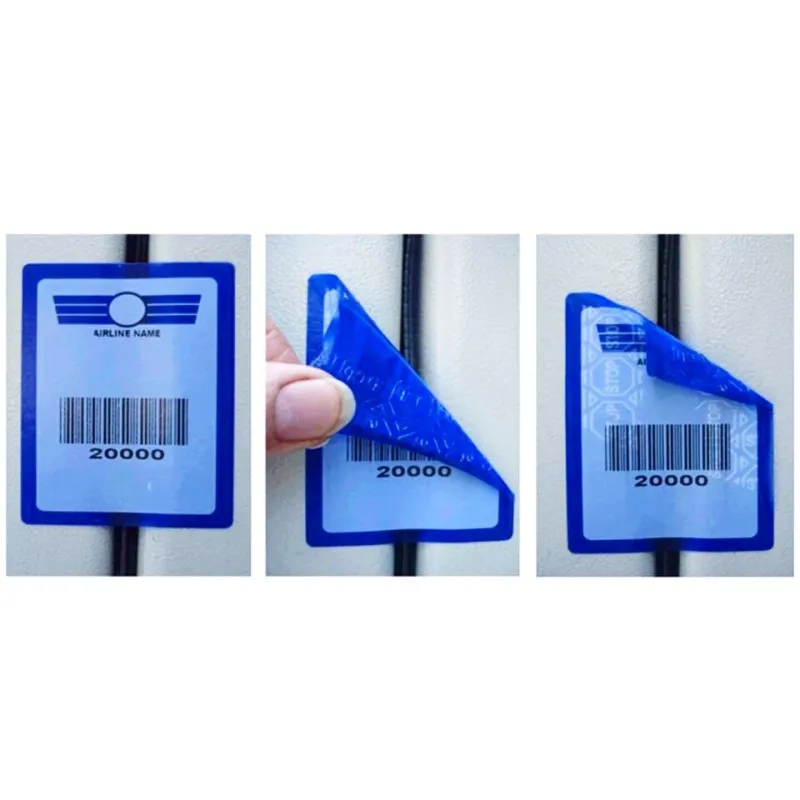
Photo: TamperTechTeam, CC BY-SA 4.0, via Wikimedia Commons
Emergency access is one of those controls that is easy to postpone until it is needed. A single administrator leaves, falls ill, loses a phone, or is locked out of a tenant, and the business discovers that its recovery route depends on a shared password in a drawer or a former employee's memory. For UK small firms, the answer is not to hide a key under the mat. It is to create a break-glass arrangement that is sealed, recorded, monitored, and tested.
The term break-glass is useful because it sets the right expectation. The account should be used rarely, deliberately, and with a clear record of why it was opened. It is a controlled exception, not a convenience login for the managing director or a fallback for routine support. This article sets out a practical audit framework for Microsoft 365, line-of-business applications, and network equipment.
Start with the scenario, not the tool
Before creating or reviewing any emergency account, write down the situations it is meant to address. Typical examples include the departure of the only global administrator, a lost authentication device, a supplier outage that prevents normal sign-in, or a locked account during an urgent restore. The list should be short and specific. If an account would be used for everyday administration, it is not a break-glass account.
Define who can declare an emergency and who must authorise use. In a small firm, that may be the managing director and one other senior manager. The authorisation can be a simple email or signed note, but it should be recorded before the seal is broken where circumstances allow. The aim is to prevent a quiet workaround becoming a permanent second route into critical systems.
Inventory every route into the estate
An audit should cover more than Microsoft 365. List the systems where loss of administrator access would stop the business: the Microsoft 365 tenant, the finance or practice-management application, the domain registrar, the firewall, the main network switch, the backup console, and any website or e-commerce platform. For each system, record whether an emergency account exists, who can access it, and how it is protected.
Where possible, emergency accounts should be cloud-only or local to the system rather than tied to a named person's mailbox. In Microsoft 365, that means a dedicated account with no licence, no mailbox, and no routine sign-in activity. On network equipment, it means a named emergency administrator account rather than a generic vendor default. The objective is to separate the account from the individual so that a leaver does not take the recovery route with them.
Use dual custody, not a shared secret
A sealed envelope in a safe can be perfectly adequate for a small firm, provided it is managed properly. The credential should be placed in a tamper-evident envelope, signed across the seal, and logged in and out. Two named custodians should be responsible: one holds the physical seal, and the other holds the second factor or the authority to release it. Neither person should be able to use the account alone without leaving a record.
A password manager with an emergency-access feature can serve the same purpose, but it must be configured deliberately. Access should be limited to two or three named individuals, alerts should be enabled, and the emergency contact should not be the same person as the day-to-day administrator. Credentials should never be stored in a shared mailbox, a spreadsheet on a file server, or a note in a ticketing system. Those are the modern equivalent of the key under the mat.
Make every use visible
Break-glass access is only acceptable if it is noisy. Any sign-in to an emergency account should generate an alert to at least two people who are not the person using it. In Microsoft 365, this can be done through sign-in alerts, audit-log monitoring, or a managed detection rule. On network equipment, enable logging to a central syslog server or send authentication alerts by email. For business applications, check whether the supplier offers administrator login notifications and turn them on.
Multi-factor authentication should be part of the design, but it needs care. If the password and the second factor are sealed in the same envelope, the control is weaker than it appears. A common approach is to keep a hardware security key with the second custodian or in a separate sealed container. The point is not to create an impossible process; it is to ensure that opening the emergency route requires more than one person and leaves evidence.
Keep an ownership record that survives people
A simple register is enough. For each emergency account, record the system, account name, purpose, custodian A, custodian B, seal identifier, date sealed, last test date, last rotation date, and the manager who approved the arrangement. Store the register offline or in a secure vault that does not depend on the same systems the account is meant to recover. Review it quarterly and whenever a custodian changes role or leaves the business.
The register should also name the supplier or support route for each system. If the emergency account fails, the business needs to know who to call and what evidence the supplier will require. That information is often more valuable than the password itself.
Test quarterly with a defined routine
An untested break-glass account is an assumption. Set a quarterly test, choose a low-risk window, and notify the people who will receive alerts. Open the seal, sign in, perform a read-only check that the account has the expected permissions, sign out, and confirm that the alert was received. Record the result, reseal the credential with a new tamper-evident seal, and rotate the password if it was exposed during the test.
If the test fails, treat it as a finding rather than a nuisance. A break-glass account that cannot sign in, cannot receive a reset, or does not trigger an alert is not a control. Fix it before the next quarter, and record the remediation in the register. For firms with limited IT resource, a single morning per quarter is usually enough.
Treat use as an incident, not a shortcut
When the account is used for a genuine emergency, rotate the credential immediately afterwards, reseal it, and review what the account did. Record the reason, the authorisation, the actions taken, and the time the seal was restored. If the use was for convenience rather than a real emergency, escalate it through the same process. That distinction matters for governance and for any future audit.
A short audit checklist
- Confirm that every critical system has a documented emergency route.
- Check that emergency accounts are not tied to named individuals or shared mailboxes.
- Verify dual custody and a tamper-evident seal or equivalent password-manager control.
- Confirm that MFA is enabled and stored separately from the password where practicable.
- Check that sign-in alerts reach at least two people.
- Review the ownership register for leavers, role changes, and stale entries.
- Complete and record the quarterly test, including alert confirmation.
- Rotate credentials after any use or suspected exposure.
For UK SMEs, the regulatory backdrop is familiar: the UK GDPR requires appropriate technical and organisational measures, and Cyber Essentials expects administrative accounts to be controlled. A break-glass audit does not need to be elaborate. It needs to be honest. The question is not whether the business has a spare key, but whether it knows who holds it, who can authorise its use, and how it will know if someone turns the lock.