Before the Cabinet Door Opens: A Half-Day Network Map Sprint for Small Firms
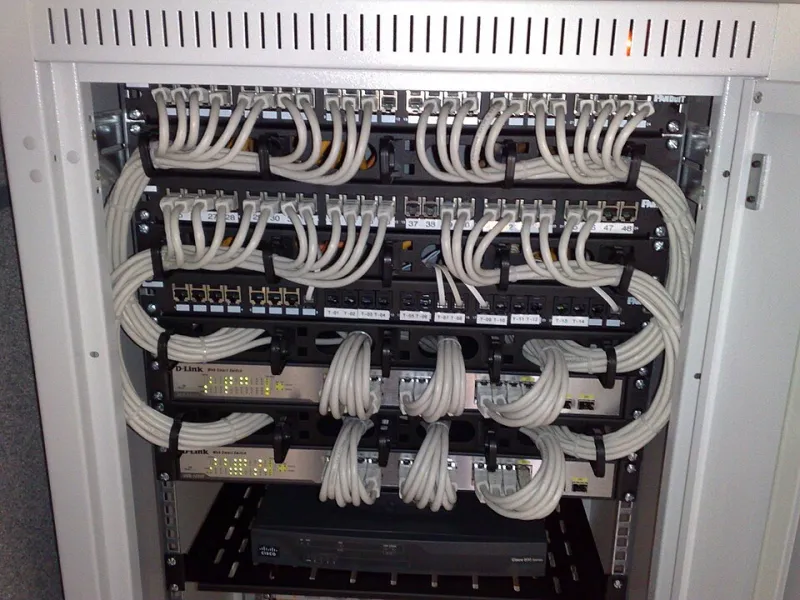
Photo: Dsimic, CC BY-SA 4.0, via Wikimedia Commons
Every small firm has a comms cupboard. Most have a router in it that nobody has logged into since installation, a switch with unlabelled patch leads, and a Wi-Fi access point balanced on a shelf. This is not a sign of negligence so much as a sign of priorities: the network worked, so nobody looked.
The difficulty arrives in a single afternoon. A circuit fails and the provider asks for the service ID. A key member of staff leaves and the admin password goes with them. A new managed service provider asks for a site survey and quotes blind because there is nothing to survey against. In each case, an hour of documentation done earlier would have saved a day.
What the map is actually for
Documentation earns its keep twice. First, as a recovery asset: during an outage it tells a responder what depends on what, and which box to reboot in which order. Second, as an onboarding tool: it lets a new starter, a new IT supplier or a covering engineer understand the estate in twenty minutes rather than two days.
A hand-drawn diagram with correct labels beats a polished document with guesses in it. Accuracy over aesthetics.
Before you begin
Book half a day, tell people the internet may blip, and bring a torch, a label printer, a phone camera, a laptop and a notepad. Get permission to be in the cupboard and to photograph it. If a third-party IT provider holds the credentials, ask them to attend or to supply the details in advance; if they will not, that is itself a finding worth recording.
The order of work
Work outwards from the wall. Circuits first, because everything else is downstream of them.
1. Circuits
Record the provider, service ID, technology (FTTP, FTTC, SOGEA, leased line), contracted speed, static IP addresses, contract end date and the support number. Note whether any line is used only for card terminals, alarms or voice.
2. Router and firewall
Make, model, serial number, admin address, firmware version, and who holds the administrative credentials. Note the WAN configuration type and whether the device is provider-managed or yours.
3. Switching
Port count, uplink arrangement, any VLANs in use, and Power over Ethernet budget if you run access points or cameras from the switch.
4. Wireless
Where each access point is mounted, its model, whether it is controlled centrally or standalone, and the SSIDs in use. Mark which SSID is for staff, which for guests, and whether the guest network is genuinely isolated from the business network.
5. Endpoints and peripherals by room
Desks, printers, scanners, tills. Room-level detail is enough; you are not inventorying every laptop.
6. The devices nobody counts
The door access controller, the CCTV recorder, the card payment terminal, the heating controller, the franking machine. These are frequently the oldest and least patched things on the network and are routinely missed in handovers.
A template that fits on two pages
| Asset | Location | Make and model | Serial | IP address | Managed by | Credentials held by | Firmware or contract date |
|---|
And a second table for circuits:
| Provider | Service ID | Technology | Speed | Static IPs | Contract end | Support number | Escalation contact |
|---|
Two tables, a hand-drawn topology sketch and a photograph of the cabinet are enough. Resist the urge to build a database.
Labels are the cheapest resilience available
Label both ends of every patch lead. Label the port on the switch rather than relying on the cable, because cables get swapped. Photograph the cabinet before you change anything and again afterwards. Print the port map, laminate it, and tape it inside the cupboard door. If your firm uses colour conventions for voice, data and guest, write the convention down; six months later nobody remembers what the yellow lead meant.
Credentials without a spreadsheet on the wall
Store administrative credentials in a password manager with named user accounts, not a single shared login. Keep break-glass credentials in a sealed envelope in the safe with a signed access log, and rotate them when anyone with access leaves. Multi-factor authentication on the vault is not optional. The file called IT passwords on the shared drive is a liability and should be removed the day the map is finished.
Record the gaps
The most valuable section of a first-pass map is the list of things you could not establish. Unknown admin password. Circuit service ID held by a former provider. Access point with no record of installation. These are findings, and they belong in the document rather than in someone's memory. Assign each one an owner and a date.
Ownership and review rhythm
Name one owner, usually an operations manager or the account manager at your IT provider. Review the document on four triggers: a new circuit, a new access point, a leaver with technical access, and an office move. Add a light quarterly check to confirm nothing has been added quietly. Date and version every copy, keep a printed copy in the cabinet for use during an outage, and keep an encrypted copy in cloud storage so it survives a site problem.
The half day is a one-off. The review is ten minutes a quarter. Between them, they turn a cupboard of mystery into an estate you can hand to anyone.